Showing posts with label samsung photo recovery. Show all posts

Friday, September 18, 2015

Samsung Photo Recovery - Recover Deleted Photos, Videos Data on Samsung Galaxy S5/S4/S6/Note

Tips: This article teach you two ways to scan and recover deleted photos and videos from Samsung smart phone,you can use a professional android photos recovery or general photos recovery software to recover lost/deleted photos back from Samsung.

Accidentally deleted an important photo or videos on your Samsung Galaxy S3, S4, S5, S6, Note or Tab? Lost something important like a funny video or picture when your phone crashed? Completely reset or formatted your phone by mistake and lost everything?

You have some memorable and meaningful videos recorded by your Samsung Galaxy on Birthday Day? Or a funny /sweet video with friends on your Family Day? You never thought you would lose or miss them ever, right? But accident always happens. What if you delete one or all of them by mistake? What if the SD card on your Samsung Galaxy break up and all data is gone? Relax. Here we tell you how to recover all of them effortlessly with Samsung Photo Recovery.

recover samsung videos photos.jpg
Don’t panic! Here the Android Photos Recovery tool will help you recover photo and videos on Samsung Galaxy S3, S4, S5, S6, Note or Tab directly. With it, you will find recovering deleted pictures/videos from Samsung Android devices is so easy, no matter you are a Windows user or a Mac user.

What’s more,the Samsung Photo Recovery - Android Photo Recovery is a reliable as well as professional recovery software, which is designed to recover deleted photos from Samsung Galaxy. It is completely compatible with your Samsung Galaxy S/Note. Besides, HTC, Motorola, Sony, LG and more other popular Android devices are also supported to recover lost data. Follow the easy guide below and read the simple four steps carefully. Figure out how to regain your deleted/lost videos on Samsung Galaxy now.

Then download deleted photo recovery for Samsung galaxy smartphone. The software is simple and efficient in undelete/recover deleted photos, videos and audio files.

You can download the free trial version first and scan for lost videos:

Download Windows Version Download Mac Version

Part 1: Recover Deleted Photos/Videos from Samsung Galaxy S3/S4/S5/S6/Note/Tab:

Step 1. Run the Android Data Recovery and connect the Samsung to PC
Firstly, download and install this Galaxy S5 photo recovery to your computer, connect your device to the program, and run this software to let it detect your device.
Step 2. Identify your Samsung Galaxy S smartphone
Next, you need to enable USB debugging to let the program identify your device. Just follow the instructions in the window to enable USB debugging.


Step 3. Scan your device for the lost photos on Samsung
After the software indentifies your device, click Scan to scan your Galaxy S5.


Step 4. Preview and recover deleted photos from Samsung Galaxy S5
After the scan, you can go to the photo folder on the left sidebar to preview the photos found on your Galaxy S5, select the items you need, hit Recover to retrieve lost pictures.


Part 2: Retrieve Deleted Photos from Samsung Galaxy S5 Memory Card

Photo Recovery is an easy-to-use program to recover lost photos and videos from different devices, follow the steps below to recover deleted photos from memory card in your Galaxy S5.

Free download the data recovery software to restore samsung photos:


Step 1. Connect your memory card to the Photo Recovery
Firstly, connect your memory card to your computer using the card reader (recommended for safety’s sake; you can also connect your device to the computer), run the Photo Recovery.
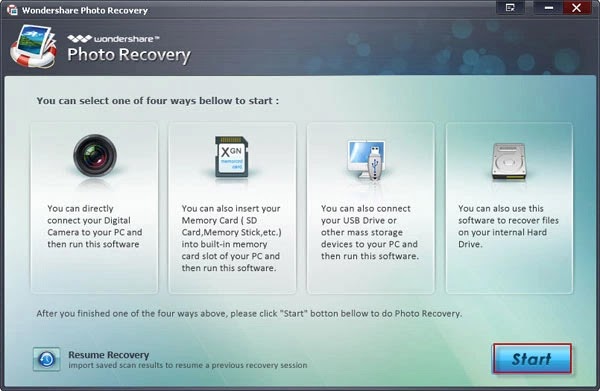

Step 2. Scan your memory card inside of your Samsung phone
Next, select your memory card to scan for the lost photos.


Step 3: Preview and restore the lost photos
After the scanning is done, all files found on the memory card will be listed on the left panel, go to the photo folder to preview the pictures, tick the ones you need, and click Recover to restore them from the card.


What's more about Android Data Recovery:

The Samsung Data Recovery - Android Data Recovery also can restore photos, music, contacts and text messages deleted, formatted or lost from Samsung mobile phones and tablets, such as Samsung Galaxy S5/S4/S3/S2, Note 4/3/2. It is also compatible with other Android devices like HTC, LG, Motorola, Sony, Huawei, ZTE, etc. and fully able to rescue data from both internal memory card and external SD card. Everything can be recovered without any data loss. Now, let's have a try!

 Read more:

Recover Galaxy S5 Lost Contacts: Samsung Data Recovery, is specially designed for rescuing deleted contacts from Samsung Galaxy. It will extract lost contacts directly from your Samsung S5 device and you also can use this data recovery to restore sms,photos,videos from Samsung Galaxy S5 smart phone directly.

Recover Samsung Galaxy Lost SMS: Sometimes Samsung Galaxy users get despaired searching for an easy way to recover the lost SMS. They could be texted from your business partner or firends,the android sms recovery allows you scan and recover lost or deleted messages from Samsung Galaxy phone directly.

Saturday, October 11, 2014

How to Recover Deleted Photos from Galaxy S5/S6/S7

Do you want to recover photos and pictures from Samsung Galaxy S5/S6/S7? This article tells you how to recover deleted photos on Galaxy S5 with professional Android photos recovery program,you also can retrieve lost or deleted data from Samsung Galaxy S7/S7 Edge, Samsung Galaxy S6/S6 Edge in the same steps.

Many reports suggest that the Samsung Galaxy S5 sells better than its predecessor Galaxy S4 during its own launch. It took 0.7% of the Android market in the first week after it made its debut, and took 16 days for it to reach the same milestone on the Galaxy S4 last year.

If you use Samsung Galaxy S4 before and want to transfer contacts, text messages, photos and other data from Galaxy S5 to Samsung Galaxy S6/S7/Note 7,you can use this Mobile Transfer,which allows you transfer any data from old Samsung to new Samsung Galaxy.

Recover Photo from Samsung Galaxy S5
Some android users may ask,once we deleted photos on Samsung Galaxy S5,how can we restore deleted photos from Galaxy S5? Today,let’s talk about the use guide to recover samsung galaxy photos,next we show recover samsung galaxy s5 lost photos for example.

Samsung Galaxy S5 Photo Recovery-Android Photo Recovery

The Android Data Recovery software manufactured by professional software development company,now may android phone users use this android recovery to restore contacts, sms, photos,ect from Samsung phones/tablets.This photo recovery for android program has been upgraded to support the new Samsung Galaxy S5. It is a nice program to recover deleted or lost photos from Galaxy S5 and other Android devices. All important data can be restored, you can use this samsung data recovery to recover photos, videos, music, contacts, text messages, whatsapp history, etc.on your Samsung galaxy mobile phone directly.In additional,if your Galaxy S5 is broken,like broken screen, black screen of death,
the Android Data Recovery can help you recover deleted photos from broken Samsung Galaxy S5 directly.

Free download the android data recovery:

Download Windows Version Download Mac Version 

Tips: This Android Data Recovery works well with all Samsung phones,such as Samsung Galaxy S4/S3/S2, Galaxy Ace, Galaxy Note 4/3/2,ect.

How to Restore deleted Pictures from Samsung Galaxy S5

Step 1: Connect Samsung Galaxy S5 to your computer, and then click Start button to identify your device.

connect S5 to PC

Step 2: Then, the Android Data Recovery will start to scan your Galaxy S5, you can see the scanning process.

select the photos itmes

begin to scan your galaxy s5 for deleted photos

Step 3: Preview and select the pictures to be recovered, and click Recover button, the software will restore your deleted samsung pictures and save them to computer.

recover deleted or lost pictures from galaxy s5

Tips: If you want to transfer those recovered photos back to your Samsung Galaxy S5,you can use this Android Data Transfer,it can help you transfer photos,videos,sms,contacts between Samsung phone and computer directly with data losing.

Download Windows Version Download Mac Version 

Read more:

How to recover contacts from Samsung Galaxy


Samsung Photo Recovery – restore photos from your Samsung Galaxy phones or Samsung Tablets directly
Samsung Data Recovery is a powerful android data recovery software that capable to retrieve on Samsung Galaxy S5. Follow the following guide, you can recover photos, videos,contacts and text messages only few steps.

Thursday, September 4, 2014

How to Recover Deleted Pictures on Samsung Galaxy S4/S5/S3 Mini

When you accidentally deleted pictures from Samsung Galaxy S4 mobile phone,it do not mean completely deleted forever,but these data are rewritten and covered,then you still have chance to recover deleted pictures from Samsung Galaxy S4 (Galaxy S5/S3 Mini, Galaxy Note, Galaxy Ace,ect),today I teach you the truth that files lost in Samsung Galaxy S4, photos deleted from Samsung Galaxy S4 could be recovered with photo recovery software for Samsung (Download for Windows or Mac OS) in just a few minutes.

recover photo from samsung galaxy
To recover deleted photos from Samsung Galaxy S5/S4/S3 Mini,you need to use a Samsung Data Recovery-Android Data Recovery.

All you need:
1) A computer or Mac
2) A USB cable
3) A android data recovery recovery tool (Samsung Data Recovery will do. A great application, I'd say. )

Android Data Recovery which allows you restore lost pictures on Samsung android phone directly,or get lost/formatted/deleted pictures,videos back from SD card inside of your Samsung Galaxy smart phone.In additional,if deleted contacts, text messages, videos or other important data on the Samsung Galaxy S4 phone,you can also use this powerful data recovery for samsung to recover lost data from Samsung Galaxy directly.Next,let’s teach you a easy way to retrieve pictures from Samsung Galaxy S4 as example.

Download this software first and install it.

Download Windows Version   Download Mac Version

Also, this android data recovery can be used to retrieve other things like contacts. BTW.For iPhone, iPhone Data Recovery (iOS Data Recovery) should be good assisstant to help you recover lost photos from your iPhone,iPad or iPod device.

Easy Steps to Recover Samsung Galaxy S4 Photos:

You should make sure that the battery won't die in the process of recovering and the standard is 20% power or more.

Step 1.Get the Samsung Phone Connected to the Computer

It is easy to do this. When connection is done, Samsung Data Recovery will prompt you to enable USB debugging. It is supposed to entitle the PC to copy data, install apps and read log data without notification. If you don't know what to do, follow this:

1) For Android 2.3 or earlier: Enter "Settings" < Tap "Applications" < Press "Development" < Tick "USB debugging"
2) For Android 3.0 to 4.1: Enter "Settings" < Click "Developer options" < Tick "USB debugging"
3) For Android 4.2 or newer: Enter "Settings" < Click "About Phone" < Tap "Build number" for several times until "You are under developer mode" shows up < "Settings" < Click "Developer options" < Check "USB debugging"


Step 2.Scan for Lost Samsung Photos
Click "Start" to proceed to the next move.


The options are listed here for you to tick. We need "Gallery" only. (Or, when you want to find back those in WhatsApp, check "WhatsApp messages & attachments".) And then, press "Next".


Now, it is time to choose scanning modes. "Scan for deleted files" would be our choice. It cost the least time. And click "Next". When you can not find the one that are to be retrieved, try the other two modes.


When the following window shows up, go to your handset and tap "Allow". It may pop up for a few times. Choose to "Remember" if you don't want to repeat this.


After that, Samsung Data Recovery will begin to scan your phone.

Step 3.Choose Files and Recover photos,video from Samsung Galaxy

The result can be seen as below. On the side bar, tap "Gallery" and the images will be displayed on the right. See that search box? You can find the specific one instead of browsing all of them. Check what you want and press "Recover".


Note: The files that Android Photo Recovery restores are saved in your computer.

Free download the android data recovery to restore photos back from samsung galaxy:

Download Windows Version   Download Mac Version

Well done,you have restore photos on samsung galaxy smart phone directly. Hope you can find them back soon. And, the last thing I'd like to mention is that a backup file really does you good. so, back up your photos on Samsung device to computer with the help of Android Transfer tool.

Feel free to leave comments if you could not understand this article or have any problem using this program.If you like this article,please share this use guide in your Facebook or Google+.

Wednesday, June 18, 2014

Recover deleted photos from Samsung Galaxy S7/S6S4/S5/S3/Notes Mini

By Sally:
I accidentally deleted photos I took from my Samsung S4 last night and I was so upset because the pictures were of my daughter's first wedding dress try on.Is it possible to recover those deleted pictures from Samsung S4?

By Meeno:
My boy friend deleted all the photos in my Samsung Galaxy Note 4!Any way to restore photos on my Galaxy Note 4? Thanks a lot!

By Miki:
How can I recover deleted photos on Samsung Galaxy S7? I would like to take a lot of photos and videos in my daily life and store them on the Samsung Galaxy S7 smart phone,is it possible to restore deleted pictures on Galaxy S7?Thank you!

Actually,tell you the truth that the photos and videos deleted from Samsung Galaxy are not necessarily erased, they are still stored on your mobile phone, those deleted files only be rewrote and save on the hard disk storage,you can’t get them back without professional data recovery software.With proper Samsung Galaxy Photo Recovery software, files deleted or lost from Samsung Galaxy mobile phone could be recovered with photo recovery software in just a few clicks of mouse.
Because the Samsung Galaxy running on Android OS,however,you can use a professional Android Data Recovery software to restore deleted photos, videos back from Samsung Galaxy phones easily.

Recover deleted photos from Samsung Galaxy
Here,I recommend you this Android Photo Recovery software,which allows you recover photos, videos from Samsung galaxy mobile phone,like Samsung Galaxy S7/S7 edge, Samsung Galaxy S6/S6 edge, Samsung Galaxy S5, S4, S3, S, Note 3, Note 2.

Download the free trial version below and scan for you lost data files

Download Windows Version Download Mac Version

What’s more,this Android Data Recovery software also can help you recover lost/deleted pictures from other Android phones/tablets, including Samsung, HTC, LG, Sony, Motorola, etc. In addition, it allows you restore deleted text messages, contacts, wahtsapp, music, audio and video files without any quality loss. Before recovery, you scan and preview those deleted data one by one,so you can check whatever you want back. Let’s shows you the use guide to restore samsung photos step-by-step:

How to Recover Photos from Samsung Galaxy

Note: Once you deleted photos and videos from your Galaxy, don't take any new photo, videos or transfer new documents to it, because those deleted files will be overwritten by new data.

Step 1. Run the Android Recovery and Plug in your Samsung S

Step 2. Enable USB Debugging on your Samsung Galaxy

Step 3. Start to Scan lost Data from Samsung Galaxy phone

Step 4. Restore Deleted Pictures from Galaxy mobile phone on your computer
Select the item "Gallery" to restore the recovered pictures, images and photos. Wait for the recovery process now.

Recover photo,pictures from Samsung Galaxy
Note:
1. Do not use your phone once data loss happens, so the data will not be overwritten.
2. It will be much more helpful if you back up your phone regularly.

Read more:

How to Recover Deleted Photos from Galaxy S6

Recover SMS from Samsung Galaxy

Recover Contacts from Samsung Galaxy

Tuesday, March 25, 2014

How to Recover Deleted Photos from Samsung

Last week,I accidentally deleted all photos stored on my Samsung Galaxy note 3,all of those pictures and video that I had taken in my brother’s wedding.(I forget back them to computer..but I was planning to transfer them to my computer today),but all photos on my galaxy note 3 were gond.I want to know is it possible to recover/restored/retrieve photos and videos from Samsung Galaxy phone? I want to recover photos directly from my Galaxy Note 3,thank you give me some suggestion!
Samsung Galaxy Photo Recovery
Once you delete photos on Samsung mobile phone,or for some reason cause lost pictures on your Samsung galaxy phone,please don’t take photos with you mobile phone,or don’t transfer anything to your Samsung phone,because data may rewriting and recover your lost photos/videos,it will reduce the possibility of recoverable.However,to recover deleted photos from Samsung,all you need is a Android Photo Recovery software,because the Samsung runs Android OS.
This Android Data Recovery can help you restore deleted photos from Samsung phones,it works well with all kinds of Samsung mobile phone/tablets,such as Samsung Galaxy Note 3/2/1, Galaxy S4/3/2/5, Samsung Ace,ect.

What’s more,you can use this data recovery for Android to recover lost SMS messages, videos, contacts and music from Samsung.Let’s teach you use Samsung Data Recovery to recover deleted photos from Samsung.

Here is a free trial version, you can download it first.

Free download Samsung Data Recovery(Win)   Free download Samsung Data Recovery(Mac)

How to Restore Deleted Photos from Samsung Phone

Step 1 Connect your Samsung to computer
After you running the program, connect your phone to a PC via USB.

Connect your Samsung to computer
Step 2 Enable USB debugging on your Samsung
If you didn’t debug your phone, the program will prompt you to enable USB debugging. Based on your Android OS version, choose one for your phone.
1) For Android 2.3 or earlier: Enter "Settings" < Click "Applications" < Click "Development" < Check "USB debugging"
2) For Android 3.0 to 4.1: Enter "Settings" < Click "Developer options" < Check "USB debugging"
3) For Android 4.2 or newer: Enter "Settings" < Click "About Phone" < Tap "Build number" for several times until getting a note "You are under developer mode" < Back to "Settings" < Click "Developer options" < Check "USB debugging"

Enable USB debugging on your Samsung
Step 3 Begin to analyze and scan your phone
When your device is detected by the program, you’ll move to the scan process. Before accessing the scanning, click “Start” to analyze your Samsung first.

Begin to analyze and scan your phone
Then you need to turn to the screen of your Samsung. There is a Superuser Request pops up on it. Just click "Allow" on it and "Start" button on your computer one-by-one, which will allow the program to scan deleted data from your device.

Step 4 Preview and recover photos from Samsung phone
At the last step, choose the recoverable file in the category of "Gallery" at the left side of the window. You can preview all of them one by one on the right side. Then mark what you want to save and click “Recover” to export them on your computer.

Preview and recover photos from Samsung phone
Free download Android data recovery:

Free download Samsung Data Recovery(Win)   Free download Samsung Data Recovery(Mac)

Well done,you have finished recover deleted photos on Samsung,if you want to recover videos, contacts or text messages,just follow the same steps to get your lost data back easily.All restored data are save on your computer,if you want to import those restored photos from computer to Samsung phones,you can use this Android data transfer tool to copy them back to your Samsung mobile phone easily.In additional,this Android manager tool can help your transfer everything between Android to computer,you can back up data from Android to computer or Mac directly.

Read more:

How to recover lost data from Samsung

How to recover text messages from Samsung

How to recover contacts from Samsung